
By Luka – The CometSMS November 2025
It was 2 a.m. in a hostel in Chiang Mai.
I was clearing space on my phone for photos. One swipe. “Delete All Threads” → Confirm.
Gone. 6,200 messages. Two full years.
Empty inbox. Heart in stomach.
48 hours later? Every text was back.
Here’s exactly how I did it — step-by-step, iPhone + Android, no paid apps, no tech degree.
Save this. You’ll need it one day.
Let’s go.
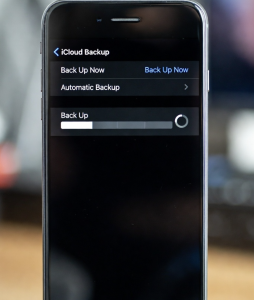
This saved me.
All 6,200 texts back. Photos. GIFs. Voice notes. Like I time-traveled.
Enable now: Settings → [Your Name] → iCloud → Messages → ON (Syncs forever)
Only works if you deleted <30 days ago
Too late for me — but your lifeline if fresh.
My friend used this on his Pixel.
All texts restored. Even the “Your order is ready” from 7-Eleven.
Enable now: Settings → Google → Backup → Turn on
My go-to for old phones.
I recovered 1,800 texts from a 6-month-old file.
Set auto-backup: Weekly → Drive
If no backup:
I found 300 old texts from 2022. Not all — but better than zero.
| Device | Backup | How Often |
|---|---|---|
| iPhone | iCloud Messages | Always |
| iPhone | Full iCloud Backup | Nightly |
| Android | Google One SMS | Auto |
| Android | SMS Backup & Restore | Weekly |
| Both | Export to Drive | Monthly |
Time: 2 minutes/week
iPhone:
Android:
I saved my “Welcome to Japan” thread. Still read it when I miss Tokyo.
Your deleted SMS live on your phone — until overwritten. One backup = one undo button.
I got 2 years back because:
Do this now:
Safe texts, Luka The CometSMS – Because some messages are your story
We provide a free, reliable, solution for receiving SMS OTP messages online. Our service allows users to protect their private phone numbers by utilizing our vast pool of disposable virtual numbers for online verification, account registration